
Firmware Update for GigEVision and USB3Vision Cameras
This article applies to the following camera series:
GigE Vision
-
33G
-
38G
-
Visus 43G
-
47G
-
All The Imaging Source GigE cameras
USB3 Vision
-
33U
-
37U
-
38U
-
Aptiris
-
All The Imaging Source USB3 cameras, except older 23U,24U and 27U cameras.
Firmware updates are provided by The Imaging Source only when necessary, for example to correct an issue or to add new functionality. There is a small risk of damaging the camera during the firmware update.
Required Software for Windows and Linux
-
Install the GenTL Producer from the Support > Downloads section.
-
Install the IC Imaging Control 4 SDK, e.g., 1.5.3.3316 or newer from the same location.
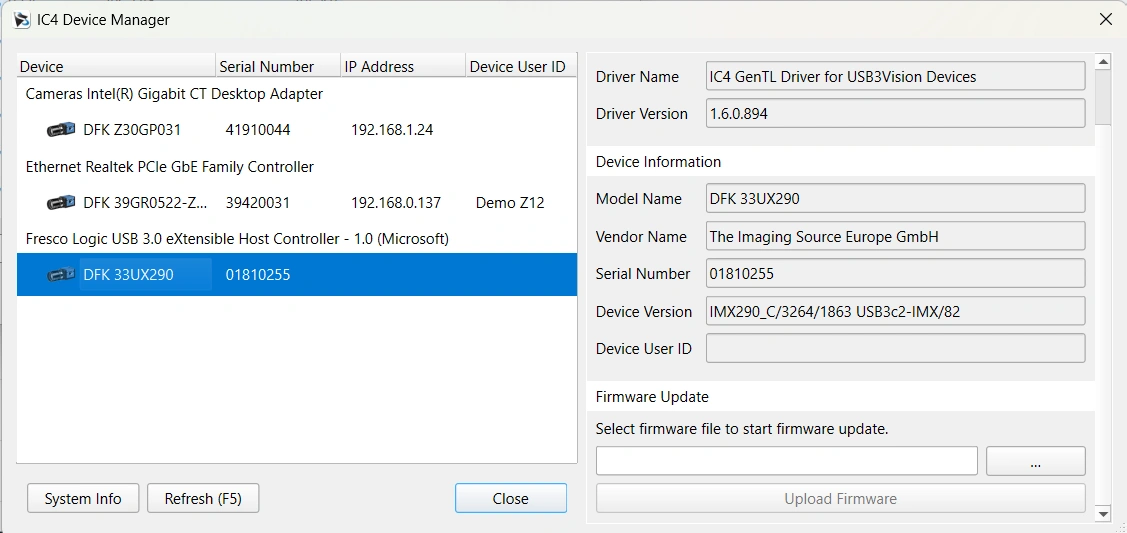
The IC Imaging Control 4 SDK includes the IC4 Device Manager.
To update the camera firmware:
-
Open the IC4 Device Manager and select your camera.
-
In the camera information panel on the right, scroll down to the firmware section.
-
Click the "..." button and select the firmware file.
-
Click "Upload Firmware".
-
Wait until the firmware update process has completed.
Do not disconnect the camera or close the application while the firmware update is in progress.